Skip to content
H3 Max logoH3 Max
Use CasesGuidesPricing

ONE STUDIO. THREE WAYS TO CREATE.

H3 Max Turbo - AI Video Generator from Text and Images

Turn text and images into videos with H3 Max. For product ads, just upload a photo—Product Agent handles the prompt for you.

One product photo at a time

The video aspect ratio follows your image.

Advanced options · Optional end frame
Resolution

Sign up for 40 free credits—enough for a 5-second video at 768P.

FROM INPUT TO VIDEO

AI video examples: from input to result

Selected H3 Max generation tests, using our own demonstration inputs. Original outputs, not customer testimonials. Press play to compare.

Image to Video · 8s requested · 768P

Glass and gold, from two angles

A gentle side move leads into a close view of the gold cap and green glass, then pulls back to the complete bottle.

Cost at these settings: 64 credits

Use this mode
Example details

An AI-generated starting image and a written two-shot prompt. Original model output, with no post-production cuts, retouching or added audio.

Input prompt: An eight-second product film from this exact starting image. The subject is the same upright olive-green rectangular glass bottle, rounded shoulders and corners, cylindrical brushed-gold cap and completely blank cream rectangular label, standing on the pale stone surface. Keep the bottle rigid, the cap closed and the blank label unchanged. [Shot 1, 0.0-3.5 seconds] Begin on the supplied image exactly. Within the first second, move the camera smoothly a short distance to the right, making a restrained ten-degree arc toward the bottle's front-right edge. The viewpoint change reveals the thickness of the green glass and slides one broad window reflection across the shoulder. Keep the bottle planted, fully visible and sharply focused; preserve the warm ivory setting and believable contact shadow. No orbit to the unseen rear. [Shot 2, 3.5-8.0 seconds] A clean direct cut to a closer front three-quarter view of the same gold cap, shoulder and upper blank label, in the identical setting. Begin with crisp brushed-metal texture and the green glass edge. Move the camera steadily backward and slightly downward to reveal the entire unchanged bottle by 7 seconds. Ease into a resolved full-product composition for the final second, with generous space around it. The soft window reflection and gold highlight follow the changing viewpoint naturally. Two real shots, no dissolves or shape morphing. Natural photographic materials and restrained exposure. No new text, writing, logos, props, hands, liquid effects, floating objects, decoration, dialogue or product claims. Keep the exact silhouette, cap proportions and label dimensions consistent between shots. The film must communicate entirely on mute.

Generated October 7, 2026. Requested duration: 8 seconds; encoded clip: 8 seconds. Credit cost above reflects today’s settings, not a customer payment record.
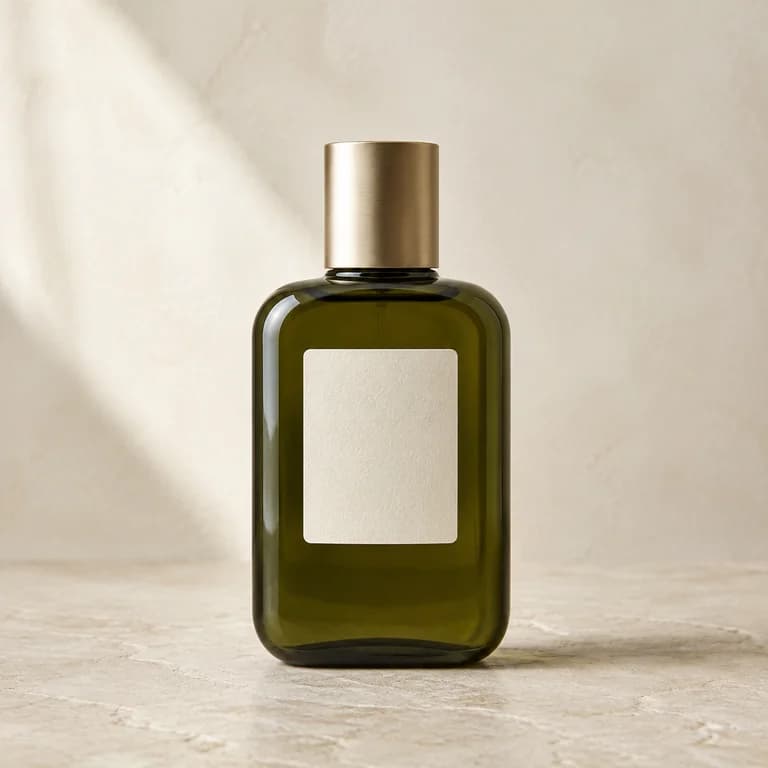

Image to Video · 5s requested · 768P

A still photo, a small moment

An orange cat blinks and settles beside the window.

Cost at these settings: 40 credits

Use this mode
Example details

An AI-generated starting image and a motion prompt. The result also includes a slight head movement. Original generated clip; no cuts or retouching.

Input prompt: A locked camera. The cat remains seated, breathes softly and blinks once. Nothing else moves except a faint shift in daylight. Preserve all shapes. No text, scene cuts or speech.

Generated September 5, 2026. Requested duration: 5 seconds; encoded clip: 5.18 seconds. Credit cost above reflects today’s settings, not a customer payment record.

Text to Video · 5s requested · 768P

Ceramic, created from words

A written description becomes a textured mug in soft window light.

Cost at these settings: 40 credits

Use this mode
Example details

Text input only, with 4:3 framing. The preview is a generated output frame, not an input image. Original generated clip; no cuts or retouching.

Input prompt: A handmade sage green ceramic mug with a gently irregular rim, a curved handle on the right, tiny speckles in the glaze and a bare clay foot. It sits on a pale wooden tabletop in front of a warm gray wall. Soft natural window light from the left. A slow camera push toward the stationary mug. No added objects, text or speech.

Generated September 5, 2026. Requested duration: 5 seconds; encoded clip: 5.18 seconds. Credit cost above reflects today’s settings, not a customer payment record.
START WITH WHAT YOU HAVE

Which AI video generation mode should you choose?

A product photo, an idea, or a frame worth moving. Every mode uses H3 Max Turbo.

Product Agent

Upload a product photo. Choose your length and resolution. Product Agent prepares the advertising prompt for you.

Create a product video

Image to Video

Bring a starting image and describe the motion. The video follows your image’s proportions.

Animate an image

Text to Video

Describe a scene, camera movement and atmosphere. Choose your framing and turn your words into a clip.

Start with a prompt

FOR YOUR WHOLE CATALOG

Create product videos in batches

Upload multiple product photos, choose shared settings and review the total cost before submitting. Keep the page open until all uploads are submitted, then follow each result in History.

Open batch workspace
Multiple photos → separate videos
Bottle product photoCeramic mug product photoFood product photo
Workflow illustration using AI-generated product images.

ROOM FOR YOUR NEXT IDEA

Choose your plan

Start with welcome credits. Add a plan or a credit pack when you need more.

Free

$0

Try all three video modes.


  • 40 welcome credits, once
  • Product Agent, text and image to video
  • 480P and 768P video
  • Download and manage your videos
  • Welcome credits never expire

Starter

$9.9/month

All video modes, with more credits.


  • 400 credits each month
  • Product Agent, text and image to video
  • 480P and 768P video
  • Download and manage your videos
  • Subscription credits expire at each credit-month boundary
  • Annual plans release credits monthly
Popular

Pro

$29.9/month

All video modes, with more credits.


  • 1,600 credits each month
  • Product Agent, text and image to video
  • 480P and 768P video
  • Download and manage your videos
  • Subscription credits expire at each credit-month boundary
  • Annual plans release credits monthly

Need a few more videos?

Add credits whenever you need them. One payment, no subscription, and no expiry.

320 credits

$9.90

Use across all three video modes.

1,200 credits

$29.90

Use across all three video modes.

480P: 5 credits per second · 768P: 8 credits per second.

Subscription credits refresh every credit month and expire at the end of that period, including annual plans. Purchased credit packs do not expire.

See plans and credit packs →

PUT YOUR FOOTAGE TO WORK

AI video use cases

Prepare a product-page clip, a social opening, or a close look at something you make.

Explore all use cases ↗
  • A ceramic mug used to prepare product media.

    Shopify Product Videos↗

    Make a short clip, then add it to your product media.

  • A bottle with visible packaging and surface details.

    Skincare Videos↗

    Work with reflections, packaging and the details in your photo.

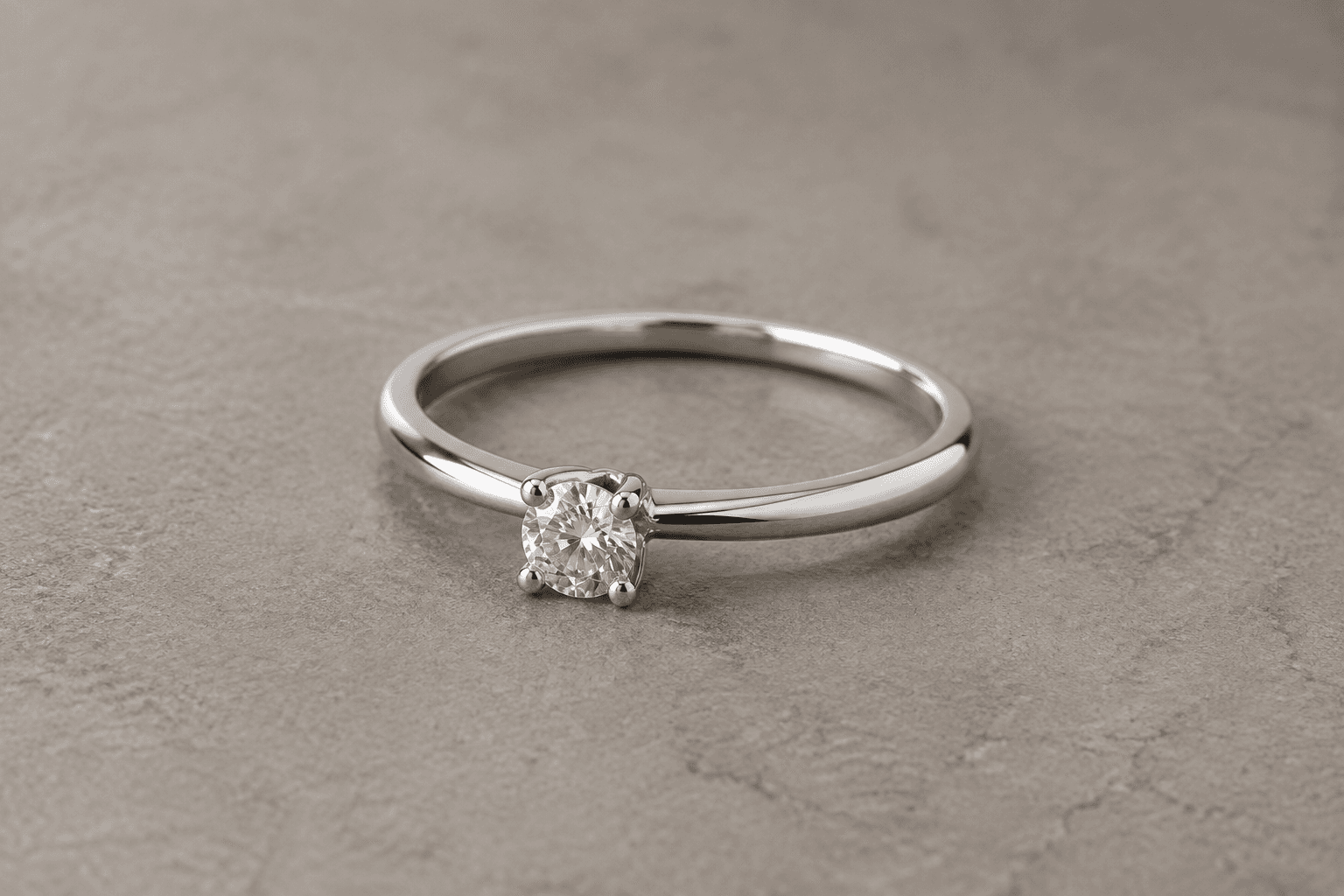
  • A ring with a visible stone setting and silver band.

    Jewelry Videos↗

    Choose restrained motion and check the small structures.

BEFORE YOUR NEXT GENERATION

AI video prompts and practical guides

Browse the guides ↗
  • Text to Video Prompts↗
  • Image to Video Prompts↗
  • Choose Your Starting Image↗

A FEW THINGS TO KNOW

Frequently Asked Questions

Have another question? Contact us.

Is H3 Max free to use?+

New users get 40 credits when they sign up, enough for one 5-second video at 768P or one 8-second video at 480P. This is a one-time signup gift. You can buy a subscription or credit pack when you need more credits.

Which model powers this video generator?+

All three modes generate video with H3 Max Turbo, fal.ai's optimized version of MiniMax H3, developed by MiniMax. Product Agent prepares the advertising prompt for you; Text to Video and Image to Video use the prompt you write.

How long does H3 Max take to generate a video?+

A 5-second video means 5 seconds of playback, not a 5-second wait. Processing time varies with clip length, resolution and queue demand. Once submission is complete, you can leave the page and check progress or download the result in History.

Do I need to write a prompt?+

Product Agent only needs your product photo. It prepares a commercial video prompt for you. Text to Video and Image to Video require your own prompt.

What is the difference between the three modes?+

Product Agent turns a product photo into a product video without asking you to write a prompt. Text to Video starts with your words. Image to Video combines a starting image with your prompt.

What video lengths and resolutions are available?+

Choose any whole-second duration from 5 to 15 seconds, at 480P or 768P. The default is 5 seconds at 768P.

Can I create vertical videos?+

Yes. Image-based modes follow the aspect ratio of your image. Text to Video lets you choose 21:9, 16:9, 4:3, 1:1, 3:4, or 9:16.

How many credits does a video cost?+

480P costs 5 credits per second; 768P costs 8 credits per second. The Generate button shows the total before you submit. A 5-second 768P video costs 40 credits.

Can I leave the page while my video is generating?+

Yes. Once a job has been submitted, it continues in the background. For batches, keep the page open until all images are uploaded and submitted, or return to resume the remaining uploads.

What happens if generation fails?+

A confirmed technical generation failure returns the credits charged for that job. You can view the reason in History and choose to generate again as a new paid job. For payment or cash refund questions, contact us for individual assistance.

Do videos include sound?+

H3 Max requests scene-appropriate ambience and sound effects by default, but the result can vary. In Text to Video or Image to Video, specify silence, music or speech in your prompt if needed. Narration and dialogue are not requested by default. Review the actual soundtrack before publishing.

Can I use the videos commercially?+

You may use outputs for lawful personal or commercial purposes, subject to our Terms and applicable provider restrictions. You must have the rights to uploaded images, brands and likenesses. AI output is not guaranteed to be unique, accurate or free of third-party rights; review it before publishing an advertisement.

Are my uploaded images and generated videos public?+

Your uploads and generated videos are not published in a public gallery. Saved media is available through your private History using temporary access links; anyone with a valid link can access that file, so share carefully. Deleting a task removes it from History and queues its media for cleanup. See our Privacy Policy for retention details.

Will my product and its background stay exactly the same?+

An uploaded photo supplies the first frame, including its background. Product Agent is not a background-removal tool, and exact preservation of labels, logos and shapes is not guaranteed. Use a clean starting image and check the complete video against your product before using it in an ad.

Does H3 Max add a watermark?+

H3 Max does not add a branded watermark to the downloaded video. Marks already present in your input or unwanted text generated by the model may still appear. Review the output before publishing; uploading a watermarked image does not give you permission to remove its ownership marks.

Do I need to verify my email before signing in?+

Yes, when registering with an email address and password, verify your email using the link we send before signing in. You do not need to reset your password to activate the account. Google sign-in uses your Google account instead.

H3 Max logoH3 Max

From an idea or an image to your next video.
H3 Max Turbo by fal.ai, based on MiniMax H3.

[email protected]

Video tools

  • Text to Video
  • Image to Video
  • Product Video Generator
  • Batch Product Videos
  • Video Ad Clips
  • B-Roll Generator

Use cases

  • Use Cases
  • Shopify Product Videos
  • Amazon Product Videos
  • Etsy Listing Videos
  • Skincare Videos
  • Jewelry Videos

Learn

  • Guides
  • Text to Video Prompts
  • Image to Video Prompts
  • Choose Your Starting Image
  • 480P vs 768P
  • Choose a Generation Mode

H3 Max

  • Pricing
  • About
  • Contact
  • Privacy
  • Terms
  • Report prohibited content
  • Cookie Policy

© 2026 H3 Max. All rights reserved.